
User Manual



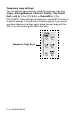


Table Of Contents
- USER'S GUIDE DCP-8040/DCP-8045D
- Brother numbers
- Ordering accessories and supplies
- Safety precautions
- Choosing a location
- Table of Contents
- 1 Introduction
- 2 Paper
- 3 On-screen programming
- 4 Getting started
- 5 Making copies
- 6 Important information
- 7 Troubleshooting and routine maintenance
- 8 Optional accessories
- Glossary
- Specifications
- Index
- brother USA/CAN

5 - 2 MAKING COPIES
Temporary copy settings
You can improve your copies by using the temporary copy keys
(
Copy
):
Enlarge/Reduce
,
Contrast
,
Quality
,
Tray Select
,
Sort
and
N in 1
(For DCP-8040) or
Duplex/N in 1
(For
DCP-8045D). These settings are
temporary
, and the DCP returns to
its default settings 1 minute after it finishes copying. If you want to
use these temporary settings again, place the next original in the
ADF or on the scanner glass within that time.
Temporary Copy Keys