
User Manual


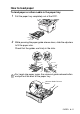


Table Of Contents
- USER'S GUIDE DCP-8040/DCP-8045D
- Brother numbers
- Ordering accessories and supplies
- Safety precautions
- Choosing a location
- Table of Contents
- 1 Introduction
- 2 Paper
- 3 On-screen programming
- 4 Getting started
- 5 Making copies
- 6 Important information
- 7 Troubleshooting and routine maintenance
- 8 Optional accessories
- Glossary
- Specifications
- Index
- brother USA/CAN

PAPER 2 - 11
To use Automatic Duplexing for copy and print
operations (For DCP-8045D)
If you want to print on both sides of the paper using the Duplex
feature for copy or print, you will need to set the Paper Adjustment
Lever to the size of paper you are using.
This feature is available for A4, Letter or Legal size paper.
(See Duplex/N in 1 on page 5-11 and Two-sided printing (Duplex
Printing)
in Software User’s Guide on the CD-ROM.)
1
Load paper in the Paper Tray or Multi-purpose Tray.
2
Set the Paper Adjustment Lever for Duplex Printing, in the back
of the DCP, to match your paper size.
3
Your DCP is now ready to print two-sided pages.
LTR/LGL
A4