
User Manual


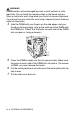


Table Of Contents
- USER'S GUIDE DCP-8040/DCP-8045D
- Brother numbers
- Ordering accessories and supplies
- Safety precautions
- Choosing a location
- Table of Contents
- 1 Introduction
- 2 Paper
- 3 On-screen programming
- 4 Getting started
- 5 Making copies
- 6 Important information
- 7 Troubleshooting and routine maintenance
- 8 Optional accessories
- Glossary
- Specifications
- Index
- brother USA/CAN

OPTIONAL ACCESSORIES 8 - 4
8
Reconnect any additional interface cables that you removed.
9
Reconnect the power cable and then turn on the DCP power
switch.
WARNI NG
If the Status LED turns Red for a Service Error, please coll Brother
Custome Service at: 1-800-284-4329 (in USA) or 1-877-BROTHER
(in Canada).
■
To check that you have installed the DIMM correctly, print
the printer settings by using the selection in the driver and
check the printout to make sure it shows the additional
memory.
■
You can check the current memory size to press
Menu
,
1
,
8
(DCP-8040) or
Menu
,
1
,
9
(DCP-8045D).