
User Manual





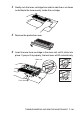

Table Of Contents
- USER'S GUIDE DCP-8040/DCP-8045D
- Brother numbers
- Ordering accessories and supplies
- Safety precautions
- Choosing a location
- Table of Contents
- 1 Introduction
- 2 Paper
- 3 On-screen programming
- 4 Getting started
- 5 Making copies
- 6 Important information
- 7 Troubleshooting and routine maintenance
- 8 Optional accessories
- Glossary
- Specifications
- Index
- brother USA/CAN

TROUBLESHOOTING AND ROUTINE MAINTENANCE 7 - 28
4
Gently rock the toner cartridge from side to side five or six times
to distribute the toner evenly inside the cartridge.
5
Remove the protective cover.
6
Insert the new toner cartridge in the drum unit until it clicks into
place. If you put it in properly, the lock lever will lift automatically.
Toner Cartridge
Drum Unit