
User's Guide
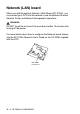

Table Of Contents
- USER'S GUIDE DCP-8020 DCP-8025D
- Brother numbers
- Ordering accessories and supplies
- Safety precautions
- Choosing a location
- Table of Contents
- 1 Introduction
- 2 Paper
- 3 On-screen programming
- 4 Getting started
- 5 Making copies
- 6 Using the DCP as a printer
- 7 Printer driver settings
- 8 How to scan using Windows®
- Scanning a document
- Scanning a document (For Windows® XP only)
- Using the scan key (For USB or Parallel interface cable users)
- Using ScanSoft® PaperPort® and TextBridge® OCR
- 9 Using the Brother Control Center (For Windows® 95/98/98SE/Me/2000 Professional and Windows NT® WS...
- 10 Using the Windows®-Based Brother SmartUI Control Center (For Windows® XP)
- 11 Using your DCP with a Macintosh®
- Setting up your USB-equipped Apple® Macintosh®
- Using the Brother printer driver with your Apple® Macintosh® (Mac OS® 8.6 - 9.2)
- Using the Brother Printer Driver with Your Apple® Macintosh® (Mac OS® X)
- Using the PS driver with your Apple® Macintosh®
- Using the Brother TWAIN scanner driver with your Macintosh®
- Using Presto!® PageManager®
- 12 Network Scanning (Windows® 98/98SE/Me/2000 Professional and XP only)
- 13 Important information
- 14 Troubleshooting and routine maintenance
- 15 Optional accessories
- Glossary
- Specifications
- Index
- brother US

15 - 5 OPTIONAL ACCESSORIES
Network (LAN) board
When you add the optional Network (LAN) Board (NC-9100h), you
can connect your DCP into the network to use the Network Scanner,
Network Printer and Network Management operations.
WARNI NG
DO NOT touch the surface of the main board within 15 minutes after
turning off the power.
For more details about how to configure the Network board, please
see the NC-9100h Network User's Guide on the CD-ROM supplied
with the DCP.
NC-9100h
Print Server