
User's Guide
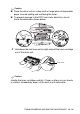

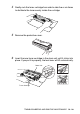
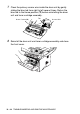
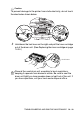
Table Of Contents
- USER'S GUIDE DCP-8020 DCP-8025D
- Brother numbers
- Ordering accessories and supplies
- Safety precautions
- Choosing a location
- Table of Contents
- 1 Introduction
- 2 Paper
- 3 On-screen programming
- 4 Getting started
- 5 Making copies
- 6 Using the DCP as a printer
- 7 Printer driver settings
- 8 How to scan using Windows®
- Scanning a document
- Scanning a document (For Windows® XP only)
- Using the scan key (For USB or Parallel interface cable users)
- Using ScanSoft® PaperPort® and TextBridge® OCR
- 9 Using the Brother Control Center (For Windows® 95/98/98SE/Me/2000 Professional and Windows NT® WS...
- 10 Using the Windows®-Based Brother SmartUI Control Center (For Windows® XP)
- 11 Using your DCP with a Macintosh®
- Setting up your USB-equipped Apple® Macintosh®
- Using the Brother printer driver with your Apple® Macintosh® (Mac OS® 8.6 - 9.2)
- Using the Brother Printer Driver with Your Apple® Macintosh® (Mac OS® X)
- Using the PS driver with your Apple® Macintosh®
- Using the Brother TWAIN scanner driver with your Macintosh®
- Using Presto!® PageManager®
- 12 Network Scanning (Windows® 98/98SE/Me/2000 Professional and XP only)
- 13 Important information
- 14 Troubleshooting and routine maintenance
- 15 Optional accessories
- Glossary
- Specifications
- Index
- brother US

14 - 31 TROUBLESHOOTING AND ROUTINE MAINTENANCE
WARNI NG
Just after you have used the DCP, some internal parts of the DCP
are extremely HOT! So please be careful.
Follow these steps to replace the drum unit:
1
Press the cover release button and then open the front cover.
2
Remove the old drum unit and toner cartridge assembly. Place
it on a drop cloth or disposable paper to avoid scattering toner.
HOT!