
Quick Setup Guide
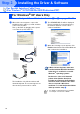
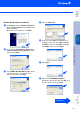
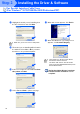
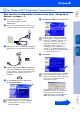
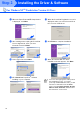
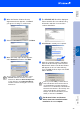
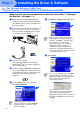
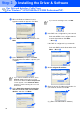
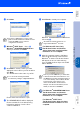
Table Of Contents
- Quick Setup Guide DCP-8020 DCP-8025D
- Getting Started
- Table of Contents
- Step1 Setting Up the Machine
- Step2 Installing the Driver & Software
- Supplied CD-ROM (MFL-Pro Suite)
- For USB Interface Cable Users (For Windows® 98/98SE/Me/2000 Professional/XP)
- For Parallel Interface Cable Users (For Windows® 95/98/98SE/Me/2000 Professional/XP)
- For Windows NT® Workstation Version 4.0 Users
- For Network Interface Cable Users (For Windows® 95/98/98SE/Me/NT/2000 Professional/XP)
- For USB Interface Cable Users
- For Network Interface Cable Users
- For Administrators
- brother US

32
Installing the Driver & Software
8
When the PaperPort
®
8.0 SE Setup window
is displayed, click Next.
9
After reading and accepting the ScanSoft
®
License Agreement, enter your user
information and click Next.
0
Select Typical and click Next.
A
Click Install and PaperPort
®
will start
installing on your computer.
B
When the ScanSoft
®
Registration screen is
displayed, make your selection and follow
the on screen instructions.
C
Click Finish to complete installation.
D
When the Brother MFL-Pro Suite
Installation window appears, click Next.
For Windows NT
®
Workstation Version 4.0 Users
If an error message appears at this point in
the installation process, or you have
previously installed MFL-Pro Suite, you will
first have to uninstall it. From the Start
menu, select Programs, Brother, Brother
MFL-Pro Suite, Uninstall, and then follow
the instructions on the screen.
Step 2