
Installation Instructions



Installing the Driver & Software
22
STEP2
Windows
®
Windows
®
Wireless
Network
Confirm your network environment
The setup process will be different depending on your network environment.
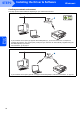
Installation using SecureEasySetup™.
If your wireless access point (A) supports SecureEasySetup™, you do not need to use a computer to
configure the machine. The access point (router) and your machine can automatically negotiate using the
SecureEasySetup
™ procedure.
For instructions, go to page 23.
Infrastructure Mode
If your wireless access point (A) does not support SecureEasySetup™, follow the instructions, on page 25.