
User`s guide
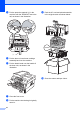
Table Of Contents
- ADVANCED USER’S GUIDE DCP-7055/DCP-7060D/DCP-7065DN
- Table of Contents
- 1 General Setup
- 2 Making copies
- A Routine maintenance
- B Glossary
- Index
- brother ARL/ASA/NZ/SAF/GLF

16
d Put the protective material (1) in the
machine with the “REMOVE” text to the
left, as shown in the illustration.
e Put the drum unit and toner cartridge
assembly back into the machine.
f Put the elastic band over the handle of
the drum unit, as shown in the
illustration.
g Close the front cover.
h Put the machine into the bag it originally
came in.
i Pack the AC cord and printed materials
in the original carton as shown below:
j Close the carton and tape it shut.
(1)
FRONT