
Owner's Manual

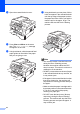
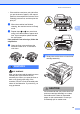

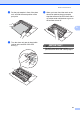
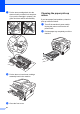

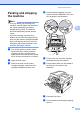

Table Of Contents
- ADVANCED USER’S GUIDE DCP-7060D/DCP-7065DN/HL-2280DW
- User's Guides and where do I find it?
- Table of Contents
- 1 General Setup
- 2 Making copies
- A Routine maintenance
- B Glossary
- Index
- brother USA/CAN

Routine maintenance
23
A
c Tightly wring out a lint-free cloth soaked
in lukewarm water, and then wipe the
separator pad (1) of the paper tray with
it to remove dust.
d Wipe the two pick-up rollers (1) inside of
the machine to remove dust.
e Put the paper tray back in the machine.
f Plug the machine’s power cord back into
the AC power outlet. Turn on the
machine’s power switch.
1
1