
Owner's Manual

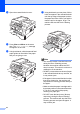
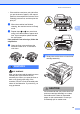

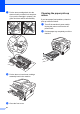


Table Of Contents
- ADVANCED USER’S GUIDE DCP-7060D/DCP-7065DN/HL-2280DW
- User's Guides and where do I find it?
- Table of Contents
- 1 General Setup
- 2 Making copies
- A Routine maintenance
- B Glossary
- Index
- brother USA/CAN

22
g Put the toner cartridge back into the
drum unit until you hear it lock into place.
If you put the cartridge in properly, the
green lock lever will lift automatically.
h Put the drum unit and toner cartridge
assembly back in the machine.
i Close the front cover.
Cleaning the paper pick-up
rollers A
If you have paper feed problems, clean the
pick-up rollers as follows:
a Turn off the machine’s power switch.
Unplug the power cord from the AC
power outlet.
b Pull the paper tray completely out of the
machine.