
Owner's Manual

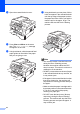
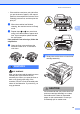

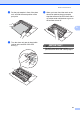
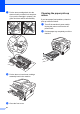

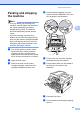

Table Of Contents
- ADVANCED USER’S GUIDE DCP-7060D/DCP-7065DN/HL-2280DW
- User's Guides and where do I find it?
- Table of Contents
- 1 General Setup
- 2 Making copies
- A Routine maintenance
- B Glossary
- Index
- brother USA/CAN

Routine maintenance
21
A
d Put the print sample in front of the drum
unit, and find the exact position of the
poor print.
e Turn the drum unit gear by hand while
looking at the surface of the OPC
drum (1).
f When you have found the mark on the
drum that matches the print sample,
wipe the surface of the OPC drum with a
dry cotton swab until the dust or glue on
the surface comes off.
IMPORTANT
DO NOT clean the surface of the
photosensitive drum with a sharp object.
1