
User Manual
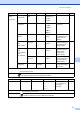
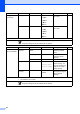
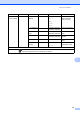
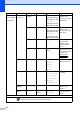

Table Of Contents
- BASIC USER’S GUIDE DCP-7060D/DCP-7065DN/HL-2280DW
- Brother numbers
- Ordering accessories and supplies
- Notice - Disclaimer of Warranties (USA and Canada)
- Compilation and Publication Notice
- Brother® One-Year Limited Warranty and Replacement Service (USA Only)
- BROTHER MULTIFUNCTION CENTER® / FAX MACHINELIMITED WARRANTY (Canada only)
- User’s Guides and where do I find it?
- Table of Contents
- 1 General information
- 2 Loading paper
- 3 Loading documents
- 4 Making copies
- 5 How to print from a computer
- 6 How to scan to a computer
- A Routine maintenance
- B Troubleshooting
- C Menu and features
- D Specifications
- Index
- brother USA/CAN

84
4.Network
(For HL-2280DW)
(Continued)
2.WLAN
(Continued)
5.WLAN
Status
1.Status Active(11b)
Active(11g)
Wired LAN
Active
WLAN OFF
AOSS Active
Connection Fail
You can see the
current wireless
network status.
2.Signal Strong
Medium
Weak
None
You can see the
current wireless
network signal
strength.
3.SSID — You can see the
current SSID.
4.Comm. Mode Ad-hoc
Infrastructure
You can see the
current
Communication
Mode.
6.MAC
Address
— — Shows the MAC
address of the
machine.
7.Set to
Default
— a Reset
b Exit
Restore the wireless
network settings to
factory default.
8.WLAN
Enable
— 1.On
2.Off*
Enable or disable the
wireless LAN
manually.
0.Network
Reset
— a Reset
b Exit
Reboot OK?
a Yes b No
Restores all network
settings to factory
default.
Level 1 Level 2 Level 3 Level 4 Options Descriptions
See Network User's Guide.
The factory settings are shown in Bold with an asterisk.