
User Manual
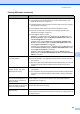
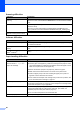
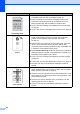
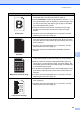
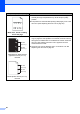
Table Of Contents
- BASIC USER’S GUIDE DCP-7060D/DCP-7065DN/HL-2280DW
- Brother numbers
- Ordering accessories and supplies
- Notice - Disclaimer of Warranties (USA and Canada)
- Compilation and Publication Notice
- Brother® One-Year Limited Warranty and Replacement Service (USA Only)
- BROTHER MULTIFUNCTION CENTER® / FAX MACHINELIMITED WARRANTY (Canada only)
- User’s Guides and where do I find it?
- Table of Contents
- 1 General information
- 2 Loading paper
- 3 Loading documents
- 4 Making copies
- 5 How to print from a computer
- 6 How to scan to a computer
- A Routine maintenance
- B Troubleshooting
- C Menu and features
- D Specifications
- Index
- brother USA/CAN

66
White lines, bands or ribbing
across the page
Check the machine's environment. Conditions such as high
humidity and high temperatures may cause this print quality
problem.
If the problem is not solved after printing a few pages, put in a new
drum unit. (See Replacing the drum unit on page 39.)
White Spots on black text and
graphics at 94 mm (3.71 in.)
intervals
Black Spots at 94 mm (3.71 in.)
intervals
Make ten copies of a blank, white sheet of paper. See How to
copy on page 24. If the problem is not solved, the drum unit may
have glue from a label stuck on the OPC drum surface. Clean the
drum unit. See Cleaning the drum unit in Appendix A of the
Advanced User's Guide.
The drum unit may be damaged. Put in a new drum unit. See
Replacing the drum unit on page 39.
Examples of poor print quality Recommendation
94 mm
(3.71 in.)
94 mm
(3.71 in.)
94 mm
(3.71 in.)
94 mm
(3.71 in.)