
User Manual
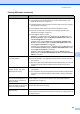
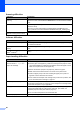
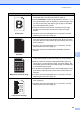
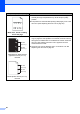
Table Of Contents
- BASIC USER’S GUIDE DCP-7060D/DCP-7065DN/HL-2280DW
- Brother numbers
- Ordering accessories and supplies
- Notice - Disclaimer of Warranties (USA and Canada)
- Compilation and Publication Notice
- Brother® One-Year Limited Warranty and Replacement Service (USA Only)
- BROTHER MULTIFUNCTION CENTER® / FAX MACHINELIMITED WARRANTY (Canada only)
- User’s Guides and where do I find it?
- Table of Contents
- 1 General information
- 2 Loading paper
- 3 Loading documents
- 4 Making copies
- 5 How to print from a computer
- 6 How to scan to a computer
- A Routine maintenance
- B Troubleshooting
- C Menu and features
- D Specifications
- Index
- brother USA/CAN

58
If you are having difficulty with your machine B
IMPORTANT
For technical help, you must call the country where you bought the machine. Calls must be
made from within that country.
If you think there is a problem, check the chart below and follow the troubleshooting tips. You can
solve most problems by yourself.
If you need additional help, the Brother Solutions Center offers the latest FAQs and
troubleshooting tips.
Visit us at http://solutions.brother.com/
.
Copy difficulties
Difficulties Suggestions
Vertical black line appears in
copies.
Black vertical lines on copies are typically caused by dirt or correction fluid on the
glass strip, or the corona wire is dirty. (See Cleaning the scanner glass in
Appendix A of the Advanced User's Guide and Cleaning the corona wire
on page 38.)
Copies are blank. Make sure you are loading the document properly. (See Using the automatic
document feeder (ADF) (For DCP-7065DN) on page 21 or Using the scanner
glass on page 22.)
Printing difficulties
Difficulties Suggestions
Poor print quality See Improving the print quality on page 63.