
User Manual
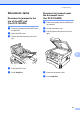

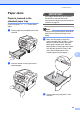
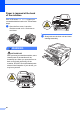
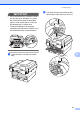
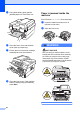
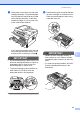
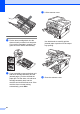
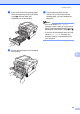

Table Of Contents
- BASIC USER’S GUIDE DCP-7060D/DCP-7065DN/HL-2280DW
- Brother numbers
- Ordering accessories and supplies
- Notice - Disclaimer of Warranties (USA and Canada)
- Compilation and Publication Notice
- Brother® One-Year Limited Warranty and Replacement Service (USA Only)
- BROTHER MULTIFUNCTION CENTER® / FAX MACHINELIMITED WARRANTY (Canada only)
- User’s Guides and where do I find it?
- Table of Contents
- 1 General information
- 2 Loading paper
- 3 Loading documents
- 4 Making copies
- 5 How to print from a computer
- 6 How to scan to a computer
- A Routine maintenance
- B Troubleshooting
- C Menu and features
- D Specifications
- Index
- brother USA/CAN

54
e Put the toner cartridge back into the
drum unit until you hear it lock into place.
If you put the cartridge in properly, the
green lock lever will lift automatically.
f If you were able to remove the drum unit
and toner cartridge assembly and the
jammed paper, you have cleared the
paper jam. Put the drum unit and toner
cartridge assembly back into the
machine and close the front cover. If the
machine does not start printing
automatically, press Start.
g Lift the scanner cover.
Use both hands to carefully pull the
jammed paper up and out of the output
tray opening.
h Close the scanner cover.