
User Manual

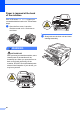
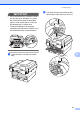
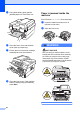
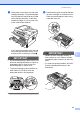
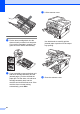
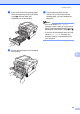

Table Of Contents
- BASIC USER’S GUIDE DCP-7060D/DCP-7065DN/HL-2280DW
- Brother numbers
- Ordering accessories and supplies
- Notice - Disclaimer of Warranties (USA and Canada)
- Compilation and Publication Notice
- Brother® One-Year Limited Warranty and Replacement Service (USA Only)
- BROTHER MULTIFUNCTION CENTER® / FAX MACHINELIMITED WARRANTY (Canada only)
- User’s Guides and where do I find it?
- Table of Contents
- 1 General information
- 2 Loading paper
- 3 Loading documents
- 4 Making copies
- 5 How to print from a computer
- 6 How to scan to a computer
- A Routine maintenance
- B Troubleshooting
- C Menu and features
- D Specifications
- Index
- brother USA/CAN

Troubleshooting
53
B
c Slowly take out the drum unit and toner
cartridge assembly. The jammed paper
may be pulled out with the drum unit and
toner cartridge assembly, or this may
release the paper so you can pull it out
of the inside of the machine.
If you can not remove the drum unit and
toner cartridge assembly easily, do not
use extra force. Instead, go to step g.
IMPORTANT
• We recommend that you put the drum unit
and toner cartridge assembly on a piece of
disposable paper or cloth in case you
accidentally spill or scatter toner.
• To prevent damage to the machine from
static electricity, DO NOT touch the
electrodes shown in the illustration.
d Push down the green lock lever and take
the toner cartridge out of the drum unit.
Clear the jammed paper if there is any
inside the drum unit.
IMPORTANT
• Handle the toner cartridge carefully. If
toner scatters on your hands or clothes,
immediately wipe or wash it off with cold
water.
• To avoid print quality problems, DO NOT
touch the shaded parts shown in the
illustrations.