
User Manual

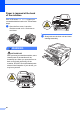
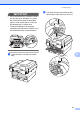
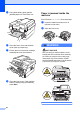
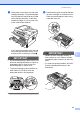
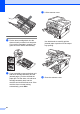
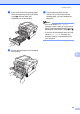

Table Of Contents
- BASIC USER’S GUIDE DCP-7060D/DCP-7065DN/HL-2280DW
- Brother numbers
- Ordering accessories and supplies
- Notice - Disclaimer of Warranties (USA and Canada)
- Compilation and Publication Notice
- Brother® One-Year Limited Warranty and Replacement Service (USA Only)
- BROTHER MULTIFUNCTION CENTER® / FAX MACHINELIMITED WARRANTY (Canada only)
- User’s Guides and where do I find it?
- Table of Contents
- 1 General information
- 2 Loading paper
- 3 Loading documents
- 4 Making copies
- 5 How to print from a computer
- 6 How to scan to a computer
- A Routine maintenance
- B Troubleshooting
- C Menu and features
- D Specifications
- Index
- brother USA/CAN

50
Paper is jammed at the back
of the machine B
If the LCD shows Jam Rear, a paper jam
occurred behind the back cover. Follow these
steps:
a Open the front cover. Leave the
machine turned on for 10 minutes to
cool down.
WARNING
HOT SURFACE
After you have just used the machine, some
internal parts of the machine will be
extremely hot. When you open the front or
back cover (back output tray) of the
machine, DO NOT touch the shaded parts
shown in the illustration. If you do this, you
may burn yourself.
b Slowly take out the drum unit and toner
cartridge assembly.