
User Manual


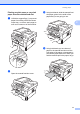
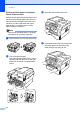
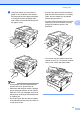

Table Of Contents
- BASIC USER’S GUIDE DCP-7060D/DCP-7065DN/HL-2280DW
- Brother numbers
- Ordering accessories and supplies
- Notice - Disclaimer of Warranties (USA and Canada)
- Compilation and Publication Notice
- Brother® One-Year Limited Warranty and Replacement Service (USA Only)
- BROTHER MULTIFUNCTION CENTER® / FAX MACHINELIMITED WARRANTY (Canada only)
- User’s Guides and where do I find it?
- Table of Contents
- 1 General information
- 2 Loading paper
- 3 Loading documents
- 4 Making copies
- 5 How to print from a computer
- 6 How to scan to a computer
- A Routine maintenance
- B Troubleshooting
- C Menu and features
- D Specifications
- Index
- brother USA/CAN

Loading paper
13
2
e Using both hands, put one sheet of
paper or one envelope in the manual
feed slot until the front edge of the paper
or envelope touches the paper feed
roller. When you feel the machine pull in
the paper, let go.
Note
• Put the paper into the manual feed slot
with the side to be printed face up.
• Make sure that the print media is straight
and in the proper position on the manual
feed slot. If it is not, the paper may not be
fed properly, resulting in a skewed printout
or a paper jam.
• Do not put more than one sheet of paper
in the manual feed slot at any one time, as
it may cause a jam.
• If you put any print media in the manual
feed slot before the machine is in Ready
mode, the print media may be ejected
without being printed on.
• To easily remove a small printout from the
output tray, lift up the scanner cover by
using both hands as shown in the
illustration.
• You can still use the machine while the
scanner cover is up. To close the scanner
cover, push it down with both hands.