
User Manual


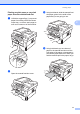
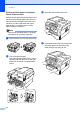
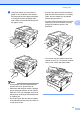

Table Of Contents
- BASIC USER’S GUIDE DCP-7060D/DCP-7065DN/HL-2280DW
- Brother numbers
- Ordering accessories and supplies
- Notice - Disclaimer of Warranties (USA and Canada)
- Compilation and Publication Notice
- Brother® One-Year Limited Warranty and Replacement Service (USA Only)
- BROTHER MULTIFUNCTION CENTER® / FAX MACHINELIMITED WARRANTY (Canada only)
- User’s Guides and where do I find it?
- Table of Contents
- 1 General information
- 2 Loading paper
- 3 Loading documents
- 4 Making copies
- 5 How to print from a computer
- 6 How to scan to a computer
- A Routine maintenance
- B Troubleshooting
- C Menu and features
- D Specifications
- Index
- brother USA/CAN

Loading paper
11
2
Printing on plain paper or recycled
paper from the manual feed slot
2
a Unfold the support flap (1) to prevent
paper from sliding off the face-down
output tray, or remove each page as
soon as it comes out of the machine.
b
Open the manual feed slot cover.
c Using both hands, slide the manual feed
slot paper guides to the width of the
paper that you are going to use.
d Using both hands, put one sheet of
paper in the manual feed slot until the
front edge of the paper or transparency
touches the paper feed roller. When you
feel the machine pull in the paper, let go.
1
1