
User Manual


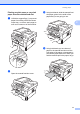
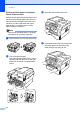
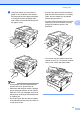

Table Of Contents
- BASIC USER’S GUIDE DCP-7060D/DCP-7065DN/HL-2280DW
- Brother numbers
- Ordering accessories and supplies
- Notice - Disclaimer of Warranties (USA and Canada)
- Compilation and Publication Notice
- Brother® One-Year Limited Warranty and Replacement Service (USA Only)
- BROTHER MULTIFUNCTION CENTER® / FAX MACHINELIMITED WARRANTY (Canada only)
- User’s Guides and where do I find it?
- Table of Contents
- 1 General information
- 2 Loading paper
- 3 Loading documents
- 4 Making copies
- 5 How to print from a computer
- 6 How to scan to a computer
- A Routine maintenance
- B Troubleshooting
- C Menu and features
- D Specifications
- Index
- brother USA/CAN

Chapter 2
10
d Put paper in the tray and make sure:
The paper is below the maximum
paper mark (b b b) (1).
Overfilling the paper tray will cause
paper jams.
The side to be printed on must be
face down.
The paper guides touch the sides of
the paper so it will feed properly.
e Put the paper tray firmly back in the
machine. Make sure that it is completely
inserted into the machine.
f Unfold the support flap (1) to prevent
paper from sliding off the face-down
output tray.
Loading paper in the manual
feed slot 2
You can load envelopes and special print
media one at a time into this slot. Use the
manual feed slot to print or copy on labels,
envelopes or thicker paper.
Note
The machine automatically turns on the
Manual Feed mode when you put paper in
the manual feed slot.
1
1
1