
User Manual


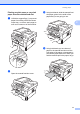
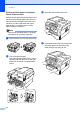
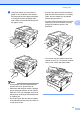

Table Of Contents
- BASIC USER’S GUIDE DCP-7060D/DCP-7065DN/HL-2280DW
- Brother numbers
- Ordering accessories and supplies
- Notice - Disclaimer of Warranties (USA and Canada)
- Compilation and Publication Notice
- Brother® One-Year Limited Warranty and Replacement Service (USA Only)
- BROTHER MULTIFUNCTION CENTER® / FAX MACHINELIMITED WARRANTY (Canada only)
- User’s Guides and where do I find it?
- Table of Contents
- 1 General information
- 2 Loading paper
- 3 Loading documents
- 4 Making copies
- 5 How to print from a computer
- 6 How to scan to a computer
- A Routine maintenance
- B Troubleshooting
- C Menu and features
- D Specifications
- Index
- brother USA/CAN

Loading paper
9
2
b While pressing the green paper-guide
release lever (1), slide the paper guides
to fit the paper size you are loading in
the tray. Make sure that the guides are
firmly in the slots.
Note
For Legal or Folio size paper, press the
release button in the bottom of the paper
tray and then pull out the back of the paper
tray. (Legal or Folio size paper is not
available in some regions.)
c Fan the stack of paper well to avoid
paper jams and misfeeds.
1
1