
User Manual
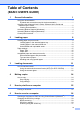
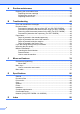


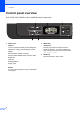
Table Of Contents
- BASIC USER’S GUIDE DCP-7060D/DCP-7065DN/HL-2280DW
- Brother numbers
- Ordering accessories and supplies
- Notice - Disclaimer of Warranties (USA and Canada)
- Compilation and Publication Notice
- Brother® One-Year Limited Warranty and Replacement Service (USA Only)
- BROTHER MULTIFUNCTION CENTER® / FAX MACHINELIMITED WARRANTY (Canada only)
- User’s Guides and where do I find it?
- Table of Contents
- 1 General information
- 2 Loading paper
- 3 Loading documents
- 4 Making copies
- 5 How to print from a computer
- 6 How to scan to a computer
- A Routine maintenance
- B Troubleshooting
- C Menu and features
- D Specifications
- Index
- brother USA/CAN

Chapter 1
6
Control panel overview 1
DCP-7060D, DCP-7065DN, and HL-2280DW have the same keys.
1 COPY keys:
Options
You can quickly and easily choose temporary
settings for copying. These settings include:
Quality
Stack (choose number of copies)
Sort (For DCP-7065DN when using the ADF)
Brightness
Contrast
Enlarge/Reduce
Page Layout
Duplex
You can choose Duplex to copy on both sides
of the paper.
2 PRINT key:
Job Cancel
Cancels a print job and clears it from the
machine’s memory. To cancel multiple print
jobs, hold down this key until the LCD shows
Job Cancel (All).
3 SCAN key
Puts the machine in Scan mode.
1
2
3
4
5