
User Manual


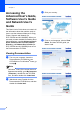
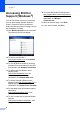
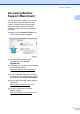
Table Of Contents
- BASIC USER’S GUIDE DCP-7060D/DCP-7065DN/HL-2280DW
- Brother numbers
- Ordering accessories and supplies
- Notice - Disclaimer of Warranties (USA and Canada)
- Compilation and Publication Notice
- Brother® One-Year Limited Warranty and Replacement Service (USA Only)
- BROTHER MULTIFUNCTION CENTER® / FAX MACHINELIMITED WARRANTY (Canada only)
- User’s Guides and where do I find it?
- Table of Contents
- 1 General information
- 2 Loading paper
- 3 Loading documents
- 4 Making copies
- 5 How to print from a computer
- 6 How to scan to a computer
- A Routine maintenance
- B Troubleshooting
- C Menu and features
- D Specifications
- Index
- brother USA/CAN

Chapter 1
2
Accessing the
Advanced User’s Guide
,
Software User’s Guide
and Network User’s
Guide
1
This Basic User's Guide does not contain all
the information about the machine such as
how to use the advanced features for Copy,
Printer, Scanner and Network (for
DCP-7065DN and HL-2280DW). When you
are ready to learn detailed information about
these operations, read the Advanced User's
Guide, Software User's Guide, Network
Glossary, and Network User's Guide (for
DCP-7065DN and HL-2280DW) that are on
the Documentation CD-ROM.
Viewing Documentation 1
a Turn on your computer. Insert the
Documentation CD-ROM into your
CD-ROM drive. For Windows
®
users, go
to step c.
Note
(Windows
®
users) If the screen does not
appear automatically, go to My Computer
(Computer), double-click the CD-ROM
icon, and then double-click index.html.
b (Macintosh users) Double-click the
Documentation CD-ROM icon, and then
double-click index.html.
c Click your country.
d Point to your language, point to View
Guide, and then click the guide you
want to read.