
User Manual


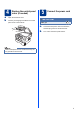
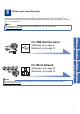
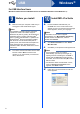
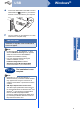
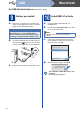
Table Of Contents
- Quick Setup Guide DCP-7055/DCP-7060D/DCP-7065DN
- Start Here
- For USB Interface Users (Windows® 2000 Professional/XP/XP Professional x64 Edition/Windows Vista®/Windows® 7)
- For USB Interface Users (Mac OS X 10.4.11 - 10.6.x)
- For Wired Network Interface Users (DCP-7065DN only) (Windows® 2000 Professional/XP/XP Professional x64 Edition/Windows Vista®/Windows® 7)
- For Wired Network Interface Users (DCP-7065DN only) (Mac OS X 10.4.11 - 10.6.x)
- Other Information
- Consumables
- brother CEE-ENG

5
4
Replace the control panel
cover (if needed)
a Open the document cover.
b Choose your language and attach the control
panel cover to the machine.
5
Connect the power cord
a Connect the AC power cord to the machine,
and then plug it into an electrical socket.
b Turn on the machine’s power switch.
Note
If the control panel cover is not fitted correctly, the
key operations will not work.
IMPORTANT
DO NOT connect the interface
cable yet.