
User Manual
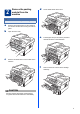
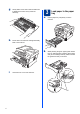
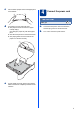
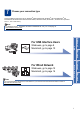
Table Of Contents
- Quick Setup Guide DCP-7055 / DCP-7060D / DCP-7065DN
- Start Here
- For USB Interface Users (Windows® 2000 Professional/XP/XP Professional x64 Edition/Windows Vista®/Windows® 7)
- For USB Interface Users (Mac OS X 10.4.11 - 10.6.x)
- For Wired Network Interface Users (DCP-7065DN only) (Windows® 2000 Professional/XP/XP Professional x64 Edition/Windows Vista®/Windows® 7)
- For Wired Network Interface Users (DCP-7065DN only) (Mac OS X 10.4.11 - 10.6.x)
- For Network Users (DCP-7065DN only)
- Other Information
- Consumables
- brother ARL/ASA/NZ/SAF/GLF

3
2
Remove the packing
material from the
machine
a Remove the packing tape from the outside of
the machine and the film covering the scanner
glass.
b Open the front cover.
c Remove the Silica Pack from the inside of the
machine.
CAUTION
CAUTION
DO NOT eat the Silica Pack. Please discard.
If ingested seek medical attention immediately.
d Lift the elastic band off the drum.
e Pull the paper strip to remove the protective
material as shown in the illustration.
f Take out the drum unit and toner cartridge
assembly.
IMPORTANT
DO NOT connect the AC power cord yet.