
User`s guide


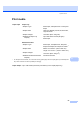


Table Of Contents
- USER’S GUIDE DCP-7030 DCP-7040
- Brother numbers
- Ordering accessories and supplies
- Notice - Disclaimer of Warranties (USA and Canada)
- Compilation and Publication Notice
- Brother® One-Year Limited Warranty and Replacement Service (USA Only)
- BROTHER MULTIFUNCTION CENTER /FAX MACHINE LIMITED WARRANTY (Canada only)
- Table of Contents
- Section I: General
- 1 General information
- 2 Loading paper and documents
- 3 General setup
- Section II: Copy
- Section III: Software
- Section IV: Appendixes
- A Safety and legal
- B Troubleshooting and routine maintenance
- C Menu and features
- D Specifications
- E Glossary
- Index
- brother USA/CAN

Specifications
85
D
Print media D
1
For transparencies and labels, we recommend removing printed pages from the output paper tray immediately after
they exit the machine to avoid the possibility of smudging.
Paper Input Paper Tray
Paper Type:
Plain Paper, Transparencies
1
or Recycled
Paper
Paper Size: Letter, A4, B5(ISO), A5, B6, A6, Executive,
Legal and Folio
Paper Weight: 16 to 28 lb (60 to 105 g/m2)
Maximum Paper Tray
Capacity:
Up to 250 sheets of 20 lb (80 g/m
2
)
Plain Paper
Manual Feed Slot
Paper Type: Plain Paper, Transparencies, Recycled
Paper, Bond Paper, Envelopes or Labels
1
Paper Size: Width: 3.0 to 8.66 in. (76.2 to 220 mm)
Length: 4.57 to 16 in. (116.0 to 406.4 mm)
Paper Weight:
16 to 43 lb (60 to 163 g/m
2
)
Maximum Manual Feed Slot
Capacity:
One sheet at a time
Paper Output Up to 100 sheets (face down print delivery to the output paper tray)