
User`s guide


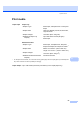


Table Of Contents
- USER’S GUIDE DCP-7030 DCP-7040
- Brother numbers
- Ordering accessories and supplies
- Notice - Disclaimer of Warranties (USA and Canada)
- Compilation and Publication Notice
- Brother® One-Year Limited Warranty and Replacement Service (USA Only)
- BROTHER MULTIFUNCTION CENTER /FAX MACHINE LIMITED WARRANTY (Canada only)
- Table of Contents
- Section I: General
- 1 General information
- 2 Loading paper and documents
- 3 General setup
- Section II: Copy
- Section III: Software
- Section IV: Appendixes
- A Safety and legal
- B Troubleshooting and routine maintenance
- C Menu and features
- D Specifications
- E Glossary
- Index
- brother USA/CAN

82
1.General
Setup
(continued)
5.LCD Contrast — b -nnnno+ a
b -nnnon+ a
b -nnonn+ a*
b -nonnn+ a
b -onnnn+ a
Adjusts the contrast
of the LCD.
21
6.User Settings — — Lists your current
settings.
21
0.Local Language — (in USA)
English*
Spanish
(in Canada)
English*
French
Allows you to
change the LCD
language for your
country.
See Quick
Setup
Guide.
2.Copy 1.Quality — Auto*
Text
Photo
You can choose the
Copy resolution for
your type of
document.
27
2.Contrast — b -nnnno+ a
b -nnnon+ a
b -nnonn+ a*
b -nonnn+ a
b -onnnn+ a
Adjusts the contrast
for copies.
26
3.Machine
Info.
1.Serial No. — — You can check the
serial number of
your machine.
77
2.Page Counter — Total
List
Copy
Print
You can check the
number of total
pages the machine
has pr
inted during
its life.
77
3.Drum Life — — You can check the
percentage of a
Drum life that
remains available.
77
The factory settings are shown in Bold with an asterisk.
Main Menu Submenu Menu Selections Options Descriptions Page