
Software User's Guide
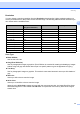
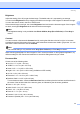


Table Of Contents
- SOFTWARE USER'S GUIDE MFC-7840W MFC-7440N MFC-7340 MFC-7345N DCP-7040 DCP-7030
- Table of Contents
- Section I Windows®
- 1 Printing
- Using the Brother printer driver
- Printing a document
- Duplex printing
- Simultaneous scanning, printing and faxing
- Printer operation keys
- Status Monitor
- Printer driver settings
- Features in the Windows® printer driver
- Features in the BR-Script (PostScript® 3 ™ language emulation) printer driver (MFC-7840W only)
- 2 Scanning
- Scanning a document using the TWAIN driver
- Scanning a document using the WIA driver (For Windows® XP/ Windows Vista®)
- Scanning a document using the WIA driver (For Windows Photo Gallery and Windows Fax and Scan users)
- Using the Scan key (For USB users)
- Using ScanSoft™ PaperPort™ 11SE with OCR by NUANCE™
- 3 ControlCenter3
- 4 Network Scanning (For models with built-in network)
- 5 Remote Setup (MFC models only)
- 6 Brother PC-FAX Software (MFC models only)
- 7 Firewall settings (For Network users)
- 1 Printing
- Section II Apple® Macintosh®
- 8 Printing and Faxing
- Printer operation key
- Status Monitor
- Features in the printer driver (For Macintosh®)
- Removing the Printer driver for Macintosh®
- Using the BR-Script3 Driver (MFC-7840W only) (Post Script® 3 ™ language emulation printer driver)
- Features in the BR-Script (PostScript® 3 ™ language emulation) printer driver (MFC-7840W only)
- Sending a fax (MFC models only)
- 9 Scanning
- 10 ControlCenter2
- 11 Network Scanning
- 12 Remote Setup
- 8 Printing and Faxing
- Index
- brother USA

Scanning
34
2
Resolution 2
You can choose a scanning resolution from the Resolution drop-down list. Higher resolutions take more
memory and transfer time, but produce a finer scanned image. The following table shows the resolutions you
can choose and the available colors.
Scan Type 2
Black & White
Use for text or line art.
Gray (Error Diffusion)
Use for photographic images or graphics. (Error Diffusion is a method for creating simulated gray images
without using true gray dots. Black dots are put in a specific pattern to give the appearance of gray.)
True Gray
Use for photographic images or graphics. This mode is more exact because it uses up to 256 shades of
gray.
256 Color
Uses up to 256 colors to scan the image.
24 bit Color
Uses up to 16.8 million colors to scan the image.
Although using 24 bit Color creates an image with the most accurate color, the image file will be about
three times larger than a file created with 256 Color. It requires the most memory and has the longest
transfer time.
Resolution Black & White/
Gray (Error Diffusion)
256 color True Gray/24 bit color
100 × 100 dpi Yes Yes Yes
150 × 150 dpi Yes Yes Yes
200 × 200 dpi Yes Yes Yes
300 × 300 dpi Yes Yes Yes
400 × 400 dpi Yes Yes Yes
600 × 600 dpi Yes Yes Yes
1200 × 1200 dpi Yes No Yes
2400 × 2400 dpi Yes No Yes
4800 × 4800 dpi Yes No Yes
9600 × 9600 dpi Yes No Yes
19200 × 19200 dpi Yes No Yes