
Quick Setup Guide


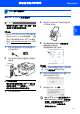



Table Of Contents

安装驱动程序和软件
14
步骤
2
Macintosh
®
Macintosh
®
USB
8 Mac OS
®
X 10.2.4 至 10.2.8 用户:
点击添加。
9 选择 USB。
10 选择所需型号名称,然后点击添加。
11 点击打印机设置实用程序,然后点击退
出打印机设置实用程序。
MFL-Pro Suite、 Brother 打印机驱
动程序、扫描驱动程序和 Brother
ControlCenter2 已安装完成。
12 若要安装 Presto!
®
PageManager
®
,请
双击 Presto! PageManager 图标并遵
循屏幕指示进行操作。
注释
Presto!
®
PageManager
®
安装完成后,
OCR
功能被添加至
Brother
ControlCenter2
。此外还可以使用
Presto!
®
PageManager
®
轻松进行扫描、
共享及管理照片和文档等操作。
Presto!
®
PageManager
®
已安装完
成。