
User Manual


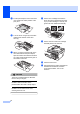


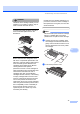

Table Of Contents
- USER’S GUIDE DCP-7030 DCP-7040
- Compilation and Publication Notice
- Table of Contents
- Section I: General
- 1 General information
- 2 Loading paper and documents
- 3 General setup
- Section II: Copy
- Section III: Software
- Section IV: Appendixes
- A Safety and legal
- B Troubleshooting and routine maintenance
- C Menu and features
- D Specifications
- E Glossary
- Index
- brother ARL/ASA/NZ

Troubleshooting and routine maintenance
67
B
d Put the drum unit and toner cartridge
assembly back in the machine.
e Close the front cover.
f Plug the machine’s power cord back into
the electrical socket first.
Turn on the machine.
Cleaning the corona wire B
If you have print quality problems, clean the
corona wire as follows:
a Turn off the machine. Disconnect all
cables, and then unplug the power cord
from the electrical socket.
b Open the front cover.
c Slowly take out the drum unit and toner
cartridge assembly.
CAUTION
We recommend that you place the drum
unit and toner cartridge assembly on a
clean, flat surface with a sheet of
disposable paper or cloth underneath it in
case you accidentally spill or scatter toner.
Handle the toner cartridge carefully. If toner
scatters on your hands or clothes, wipe or
wash it off with cold water at once.
To prevent damage to the machine caused
by static electricity, DO NOT touch the
electrodes shown in the illustration.