
User's Guide


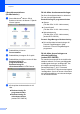


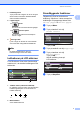


Table Of Contents
- BRUKSANVISNING DCP-385C DCP-383C DCP-387C DCP-585CW
- Sammanställning och publikation
- EU-konformitetsförklaring under R & TTE- direktivet
- Innehållsförteckning
- Avsnitt I: Allmänt
- 1 Allmän information
- 2 Ladda papper och dokument
- 3 Grundinställningar
- Avsnitt II: Kopiera
- 4 Kopiering
- Hur du kopierar
- Kopieringsalternativ
- 4 Kopiering
- Avsnitt III: Direkt fotoutskrift
- 5 Skriva ut foton från ett minneskort eller en USB-minnesenhet
- PhotoCapture Center™- funktioner
- Komma igång
- Skriva ut bilder
- PhotoCapture Center™ utskriftsinställningar
- Skanna till minneskort eller USB-minne
- Felmeddelanden
- 6 Skriva ut foton från en kamera
- 5 Skriva ut foton från ett minneskort eller en USB-minnesenhet
- Avsnitt IV: Programvara
- Avsnitt V: Bilagor
- Register
- brother SWE

Allmän information
5
1
Öppna Brother Support
(För Windows
®
) 1
Du hittar alla kontaktuppgifter du behöver,
t.ex. webbsupport (Brother Solutions Center).
Klicka på Brother support på
huvudmenyn. Följande skärm visas:
För att besöka vår hemsida
(http://www.brother.com
), klicka på
Brothers hemsida.
För den senaste informationen om
nyheter och produktsupport
(http://solutions.brother.com
), klicka på
Brother Solutions Center.
För att besöka vår hemsida för Brother
originaltillbehör
(http://www.brother.com/original/
), klicka
på Information om
förbrukningsmaterial.
Besök Brother CreativeCenter
(http://www.brother.com/creativecenter/
)
för GRATIS fotoprojekt och
utskrivningsbara nedladdningar, klicka på
Brother CreativeCenter.
För att återgå till startsidan, klicka på
Bakåt eller om du stänga cd-menyn,
klicka på Avsluta.