
User`s guide
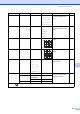



Table Of Contents
- USER’S GUIDE DCP-385C DCP-383C DCP-387C DCP-585CW
- Compilation and Publication Notice
- EC Declaration of Conformity under the R & TTE Directive
- Table of Contents
- Section I: General
- 1 General Information
- 2 Loading documents and paper
- 3 General setup
- Section II: Copy
- 4 Making copies
- Section III: Direct Photo Printing
- Section IV: Software
- Section V: Appendixes
- Index
- brother UK/IRE/GEN/SAF

94
Watermark Copy Watermark Copy
— On
Off*
(If you choose On,
see the
watermark copy
settings in the
following table.)
You can place a logo or text
into your document as a
Watermark.
31
Current Setting
——
Exit ——
Set New Default
——Yes
No
You can save your copy
settings.
32
Factory Reset ——Yes
No
You can restore all settings
to the factory settings.
32
Level1 Level2 Level3 Options Descriptions Page
The factory settings are shown in Bold with an asterisk.