
All in One Printer User Manual


Menu and Features
93
C
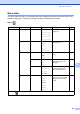
Menu ( ) (continued)
Copy (Default screen)
Level1 Level2 Level3 Options Descriptions Page
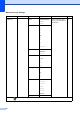
Print Repo rts Help List — — You can print these lists
and reports.
24
User Setti ngs ——
Network Config
——
Machine In fo. Serial No. — — Lets you check the serial
number of your machine.
85
Initial Se tup Date&Time — — Puts the date and time on
the LCD.
See
Quick
Setup
Guide
Local Language
(US only)
— English*
Spanish
Allows you to change the
LCD language.
23
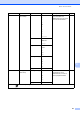
Local Language
(Canada only)
— English*
French
Allows you to change the
LCD language.
23
The factory settings are shown in Bold with an asterisk.
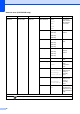
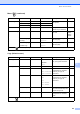
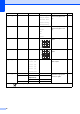
Level1 Level2 Level3 Options Descriptions Page
Quality ——Fast
Normal*
Best
Choose the Copy resolution
for your type of document.
27
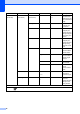
Enlarge/Reduce
100%* ——— 27
Enlarge — 104% EXE iLTR
186% 4"x6"
i
LTR
198% 4 "x6" iA4
You can choose the
enlargement or reduction
ratio for your type of
document.
27
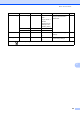
Reduce — 46% LTRi4"x6"
78%
83%
93% A4iLTR
97% LTRiA4
You can choose the
enlargement or reduction
ratio for your type of
document.
27
Fit to Page — — Your machine will adjust
the size automatically to the
paper size you set.
27
Custom(25-400%)
— — You can enter an
enlargement or reduction
ratio.
27
The factory settings are shown in Bold with an asterisk.