
User Manual

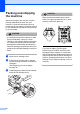



Table Of Contents
- USER’S GUIDE DCP-385C DCP-585CW
- Compilation and Publication Notice
- Table of Contents
- Section I: General
- 1 General Information
- 2 Loading documents and paper
- 3 General setup
- Section II: Copy
- 4 Making copies
- Section III: Direct Photo Printing
- Section IV: Software
- Section V: Appendixes
- Index
- brother ARL/ASA/NZ

Troubleshooting and Routine Maintenance
85
B
d Lift the front of the machine and hook
the long end (1) of the green protective
part into the T-shaped hole underneath
the machine. Push the forked end (2)
onto the top of the paper tray.
e Unplug the machine from the electrical
socket.
f Using both hands, use the plastic tabs
on both sides of the machine to lift the
scanner cover until it locks securely into
the open position. Then unplug the
interface cable from the machine, if it is
connected.
g Lift the scanner cover to release the
lock (1). Gently push the scanner cover
support down (2) and close the scanner
cover (3).
h Wrap the machine in the bag and put it
in the original carton with the original
packing material.
i Pack the printed materials in the original
carton as shown below. Do not pack the
used ink cartridges in the carton.
j Close the carton and tape it shut.
1
2
1
2
3