
User Manual


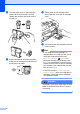


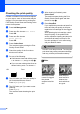
Table Of Contents
- USER’S GUIDE DCP-385C DCP-585CW
- Compilation and Publication Notice
- Table of Contents
- Section I: General
- 1 General Information
- 2 Loading documents and paper
- 3 General setup
- Section II: Copy
- 4 Making copies
- Section III: Direct Photo Printing
- Section IV: Software
- Section V: Appendixes
- Index
- brother ARL/ASA/NZ

78
d Turn the green knob on the protective
yellow cap clockwise until it clicks to
release the vacuum seal, then remove
the cap (1).
e Each colour has its own correct position.
Insert the ink cartridge in the direction of
the arrow on the label.
f Gently push the ink cartridge until it
clicks, and then close the ink cartridge
cover.
g The machine will automatically reset the
ink dot counter.
Note
• If you replaced an ink cartridge, for
example Black, the LCD may ask you to
verify that it was a brand new one
(Did You Change Black). For
each new cartridge you installed, press
+ (Yes) to automatically reset the ink dot
counter for that colour. If the ink cartridge
you installed is not a brand new one, be
sure to press - (No).
• If the LCD shows No Cartridge or
Cannot Detect after you install the ink
cartridges, check that the ink cartridges
are installed correctly.
WARNING
If ink gets in your eyes, wash them out with
water at once and call a doctor if you are
concerned.
1