
User Manual
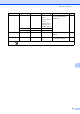


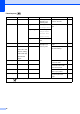


Table Of Contents
- USER’S GUIDE DCP-385C DCP-585CW
- Compilation and Publication Notice
- Table of Contents
- Section I: General
- 1 General Information
- 2 Loading documents and paper
- 3 General setup
- Section II: Copy
- 4 Making copies
- Section III: Direct Photo Printing
- Section IV: Software
- Section V: Appendixes
- Index
- brother ARL/ASA/NZ

Menu and Features
95
C
Media (Select image
from media)
Position A
B
C
D
E*
F
G
H
I
Pattern
Places a logo or text into
your document as a
Watermark using an image
from removable media.
31
Size Small
Medium*
Large
Angle -90°
-45°*
0°
45°
90°
Transparency -2
-1
0*
+1
+2
Apply —
Scan (Set page and
press start)
Transparency -2
-1
0*
+1
+2
Places a logo or text into
your document as a
Watermark using a
scanned image.
32
Apply —
Option1 Option2 Option3 Option4 Descriptions Page
The factory settings are shown in Bold with an asterisk.