
User Manual




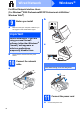
Table Of Contents
- Quick Setup Guide DCP-585CW
- Start Here
- For USB Interface Users (For Windows® 2000 Professional/XP/XP Professional x64 Edition/ Windows Vista®)
- For USB Interface Users (For Mac OS® X 10.2.4 or greater)
- For Wired Network Interface Users (For Windows® 2000 Professional/XP/XP Professional x64 Edition/ Windows Vista®)
- For Wired Network Interface Users (For Mac OS® X 10.2.4 or greater)
- For Wireless Network Interface Users
- 9 Before you begin
- 10 Confirm your network environment (Infrastructure Mode)
- Connecting the Brother machine to the wireless network
- Install the Drivers & Software (For Windows® 2000 Professional/XP/XP Professional x64 Edition/ Windows Vista®)
- Install the Drivers & Software (For Mac OS® X 10.2.4 or greater)
- Install Optional Applications Windows®
- For Wireless Network Users
- Safety and Legal
- brother EEU-ENG

6
Windows
®
USB
For USB Interface Users
(For Windows
®
2000 Professional/XP/XP Professional x64 Edition/
Windows Vista
®
)
9
Before you install
a Make sure that your computer is ON and you
are logged on with Administrator rights.
b Disconnect the machine from the power socket
and from your computer, if you already
connected an interface cable.
10
Install MFL-Pro Suite
a Put the supplied CD-ROM into your CD-ROM
drive. Follow the on-screen instructions.
b The CD-ROM main menu will appear. Click
Install MFL-Pro Suite.
c Follow the on-screen instructions.
d Choose Local Connection, and then click
Next. The installation continues.
e When this screen appears, go to the next step.
11
Connect the USB cable
a
b
c
Important
Make sure that the cable does not restrict the
cover from closing, or an error may occur.
LAN USB