
User`s guide





70
If you cannot remove the jammed
paper from the front, or the error
message still appears on the LCD
after you have removed the jammed
paper, please go to the next step.
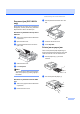
c Remove the Jam Clear Cover (1). Pull
the jammed paper out of the machine.
d Put the Jam Clear Cover back on.
Make sure the cover is set properly.
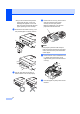
e Lift the scanner cover (1) from the front
side of the machine until it locks
securely into the open position.
Make sure that there is no jammed
paper left inside the machine.
Note
If the paper is jammed under the print
head, unplug the machine from the power
source, then move the print head to take
out the paper.
f Lift the scanner cover to release the lock
(1). Gently push the scanner cover
support down (2) and close the scanner
cover (3).
g Push the paper tray firmly back into the
machine.
1
1