
Operation Manual






70
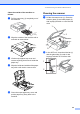
Cleaning the machine printer
platen B
WARNING
Unplug the machine from the AC power
outlet before cleaning the printer platen (1).
If ink is scattered on or around the printer
platen, wipe it off with a soft, dry, lint-free
cloth.
a Clean the machine printer platen (1).
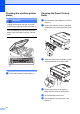
Cleaning the Paper Pick-up
Roller B
a Pull the paper tray completely out of the
machine.
b Unplug the machine from the electrical
socket and remove the Jam Clear Cover
(1).
c Clean the Paper Pick-up Roller (1) with
isopropyl alcohol on a cotton swab.
d Put the Jam Clear Cover back on.
Make sure the cover is set properly.
e Re-connect the power cord.
f Put the paper tray firmly back in the
machine.
1
1
1