
Operation Manual






General Information
5
1
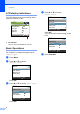
5 Stop/Exit
Stops an operation or exits from a menu.
6On/Off
You can turn the machine on or off.
If you turn the machine off, it will still
periodically clean the print head to maintain
print quality.
7 Ink Management
Lets you clean the print head, check the print
quality, and check the available ink volume.
8 Scan
Lets you access Scan mode.
9 PhotoCapture
Lets you access PhotoCapture Center™
mode.
10 Warning LED
Turns red when the LCD displays an error or an
important status message.
N
ormal
1
00%
P
lain Pap
A
4
0
01
3
4
56
2
97810