
Multi-Function Printer User's Guide


102
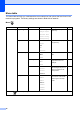
Print Settings menu
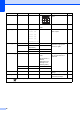
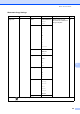
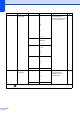
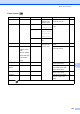
Option1 Option2 Option3 Option4 Descriptions Page
Print Qua lity
(Does not appear
for DPOF
printing.)
Normal
Photo*
— — Choose the print quality. 48
Paper Typ e Pl ain P aper
Inkjet Paper
Brother BP71
Other G lossy *
— — Choose the paper type. 48
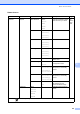
Paper Siz e 10x15cm *
13x18cm
A4
Letter
(When Letter or
A4 is chosen)
8 x 10cm
9 x 13cm
10x15cm
13x18cm
15x20cm
Max. S ize *
— Choose the paper and print
size.
48
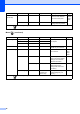
Brightness
(Does not appear
when
Enhance Photos
is chosen.)
— — Adjusts the brightness. 49
Contrast
(Does not appear
when
Enhance Photos
is chosen.)
— — Adjusts the contrast. 49
The factory settings are shown in Bold with an asterisk.
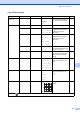
+2
+1
-1
-2
Light
Dark
+2
+1
-1
-2