
Multi-Function Printer User's Guide


Menu and Features
101
C
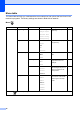
Photo Capture ( )
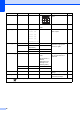
Level 1 Level 2 Level 3 Options Descriptions Page
View Photo (s) — — See the print
settings in the
following table.
You can preview your
photos on the LCD.
39
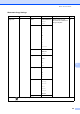
Print Inde x — Layo ut Fo rmat
6 Images/Line
*
5 Imag es/Line
You can print a thumbnail
page.
40
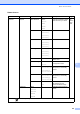
Paper Typ e Plain Paper*
Inkjet Pape r
Brother BP7 1
Other Gloss y
Paper Siz e Letter
A4*
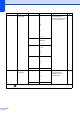
Print Phot os — — See the print
settings in the
following table.
You can print an individual
image.
41
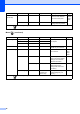
Enhance Photos
Auto Co rrect
Enhance Skin -
Tone
Enhance Scenery
Remove Red-Eye
Monochrome
Sepia
— You can adjust your photos
with these settings.
41
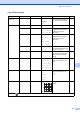
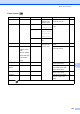
Search by Date
— — You can search your
photos in date order.
44
Print All
Photos
— — You can print all photos in
your media card or USB
Flash memory drive.
45
Slide Show — — The machine starts a Slide
Show of your photos.
45
Trimming — — You can trim your photo
and print a part of the
image.
46
The factory settings are shown in Bold with an asterisk.