
Multi-Function Printer User's Guide


98
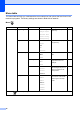
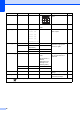
Contrast ——
Adjusts the contrast of
copies.
30
Ink Save Mode ——On
Off*
You can save some ink. 31
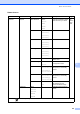
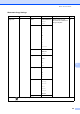
Page Layo ut — Off (1 in 1)*
2in1(P)
2in1(L)
4in1(P)
4in1(L)
Poster(3 x 3)
— You can make N in 1 or
Poster copies.
29
Book Copy On — — Corrects dark borders and
skew when copying from
the scanner glass.
32
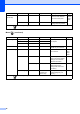
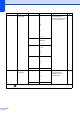
On(Preview) (Skew
Adjustment)
—
(Shadow Revise) —
Off* ——
Watermark Copy Watermark Copy
— On
Off*
(If you choose On,
see the
watermark copy
settings in the
following table.)
You can place a logo or text
into your document as a
Watermark.
32
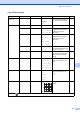
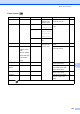
Current Setting
——
Exit ——
Set New Default
— — — You can save your copy
settings.
34
Factory R eset — — — You can restore all settings
to the factory settings.
34
Level1 Level2 Level3 Options Descriptions Page
The factory settings are shown in Bold with an asterisk.
+2
+1
-1
-2