
Multi-Function Printer User's Guide


94
Menu table C
The menu table will help you understand the menu selections and options that are found in the
machine's programs. The factory settings are shown in Bold with an asterisk.
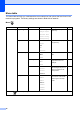
Menu ()
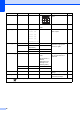
Level 1 Level 2 Level 3 Options Descriptions Page
General S etup Pape r Typ e — Plain Pap er*
Inkjet Pa per
Brother B P71
Other Glo ssy
Transparency
Sets the type of paper in the
paper tray.
21
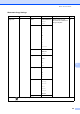
Paper Siz e — Letter
Legal
A4*
A5
10x15cm
Sets the size of the paper in
the paper tray.
21
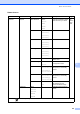
LCD Setti ngs LCD Contrast Light
Med*
Dark
Adjusts the contrast of the
LCD.
22
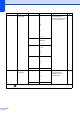
Backlight Light*
Med
Dark
You can adjust the
brightness of the LCD
backlight.
23
Dim Timer Off
10Secs
20Secs
30Secs*
You can set how long the
LCD backlight stays on for
after you go back to the
Ready screen.
23
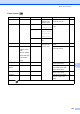
Sleep Mod e — 1Min
2Mins
3Mins
5Mins*
10Mins
30Mins
60Mins
You can choose how long
the machine must be idle
before it goes into sleep
mode.
22
The factory settings are shown in Bold with an asterisk.