
User Manual

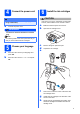


Table Of Contents
- Quick Setup Guide DCP-395CN
- Start Here
- For USB interface users (Windows® 2000 Professional/XP/XP Professional x64 Edition/ Windows Vista®)
- For USB interface users (Mac OS X 10.3.9 - 10.4.x - 10.5.x)
- For wired network interface users (Windows® 2000 Professional/XP/XP Professional x64 Edition/ Windows Vista®)
- For wired network interface users (Mac OS X 10.3.9 - 10.4.x - 10.5.x)
- Install Optional Applications Windows®
- Safety and Legal
- brother CEE-ENG

8
Macintosh
USB
For USB interface users (Mac OS X 10.3.9 - 10.4.x - 10.5.x)
10
Before you install
a Make sure your machine is connected to the
power and your Macintosh is ON. You must be
logged on with Administrator rights.
11
Connect the USB cable
a
b
c
d
IMPORTANT
• DO NOT connect the machine to a USB port
on a keyboard or a non-powered USB hub.
• Connect the machine directly to your
Macintosh.
LAN USB
IMPORTANT
Make sure that the cable does not restrict the
cover from closing, or an error may occur.
2
1
3