
User Manual

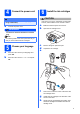


Table Of Contents
- Quick Setup Guide DCP-395CN
- Start Here
- For USB interface users (Windows® 2000 Professional/XP/XP Professional x64 Edition/ Windows Vista®)
- For USB interface users (Mac OS X 10.3.9 - 10.4.x - 10.5.x)
- For wired network interface users (Windows® 2000 Professional/XP/XP Professional x64 Edition/ Windows Vista®)
- For wired network interface users (Mac OS X 10.3.9 - 10.4.x - 10.5.x)
- Install Optional Applications Windows®
- Safety and Legal
- brother CEE-ENG

4
7
Check the print quality
a
Press Colour Start.
b Check the quality of the four colour blocks on
the sheet. (black/yellow/cyan/magenta)
c If all lines are clear and visible, press (Yes)
to finish the quality check and go to step 8.
If you can see missing short lines, press
(No) and go to d.
d The LCD asks you if the print quality is OK for
black and colour. Press (Yes) or (No).
e Press (Yes), the machine will then start
cleaning the colours.
f After cleaning is finished, press Colour Start.
The machine starts printing the Print Quality
Check Sheet again. Go back to b.
8
Set the date and time
a Press Menu.
b Press a or b to choose Initial Setup.
Press OK.
c Press a or b to choose Date&Time.
Press OK.
d Press a or b repeatedly to enter the last two
digits of the year, and then press OK.
e Repeat for Month and Day, and Hours and
Minutes in 24-hour format.
f Press Stop/Exit.
Set Paper and Press
Start