
User Manual


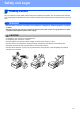
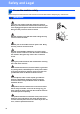


Table Of Contents
- Quick Setup Guide DCP-395CN
- Start Here
- For USB interface users (Windows® 2000 Professional/XP/XP Professional x64 Edition/ Windows Vista®)
- For USB interface users (Mac OS X 10.3.9 - 10.4.x - 10.5.x)
- For wired network interface users (Windows® 2000 Professional/XP/XP Professional x64 Edition/ Windows Vista®)
- For wired network interface users (Mac OS X 10.3.9 - 10.4.x - 10.5.x)
- Install Optional Applications Windows®
- Safety and Legal
- brother CEE-ENG

17
Safety and Legal
CAUTION
Always make sure the plug is fully inserted.
DO NOT use the machine if the power cord is frayed or
damaged, doing so may cause a fire.
DO NOT put your hands on the edge of the machine under the
scanner cover. Doing this may cause injury.
DO NOT put your hands on the edge of the paper tray under
the paper tray cover. Doing this may cause injury.
DO NOT touch the area shaded in the illustration. Doing this
may cause injury.
When moving the machine you must lift it from the base, by
placing a hand at each side of the unit as shown in the
illustration. DO NOT carry the machine by holding the scanner
cover or the Jam Clear Cover.
Lightning and power surges can damage this product! We
recommend that you use a quality surge protection device on
the AC power line or unplug the cord during a lightning storm.