
User Manual


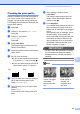



Table Of Contents
- USER’S GUIDE DCP-395CN
- Brother numbers
- Ordering accessories and supplies
- Notice - Disclaimer of Warranties (USA and Canada)
- Compilation and Publication Notice
- Brother® One-Year Limited Warranty and Replacement Service (USA Only)
- BROTHER MULTIFUNCTION CENTER / FAX MACHINE LIMITED WARRANTY (Canada only)
- Table of Contents
- Section I: General
- Section II: Copy
- 4 Making copies
- Section III: Direct Printing
- Section IV: Software
- Section V: Appendixes
- A Safety and Legal
- B Troubleshooting and Routine Maintenance
- C Menu and Features
- D Specifications
- E Glossary
- Index
- brother USA/CAN

92
Cleaning the paper pick-up
rollers B
a Pull the paper tray completely out of the
machine.
b Unplug the machine from the AC power
outlet and open the Jam Clear Cover (1)
at the back of the machine.
c Clean the Paper Pick-up Rollers (1) with
isopropyl alcohol on a cotton swab.
d Close the Jam Clear Cover.
Make sure the cover is closed properly.
e Re-connect the power cord.
f Slowly push the paper tray completely
back into the machine.
Cleaning the print head B
To maintain good print quality, the machine
will automatically clean the print head. You
can start the cleaning process manually if
there is a print quality problem.
Clean the print head and ink cartridges if you
get a horizontal line or blank text in the text or
graphics on your printed pages. You can
clean Black only, three colors at a time
(Yellow/Cyan/Magenta), or all four colors at
once.
Cleaning the print head consumes ink.
Cleaning too often uses ink unnecessarily.
IMPORTANT
DO NOT touch the print head. Touching
the print head may cause permanent
damage and may void the print head's
warranty.
a Press Ink.
b Press a or b to choose Cleaning.
Press OK.
c Press a or b to choose Black, Color or
All.
Press OK.
The machine cleans the print head.
When cleaning is finished, the machine
will go back to Ready screen
automatically.
Note
If you clean the print head at least five
times and the print has not improved, try
installing a new Genuine Brother
Innobella™ replacement cartridge for
each problem color. Try cleaning the print
head again up to five more times. If the
print has not improved call Brother
Customer Service. (See Brother numbers
on page i.)
1
1