
User Manual


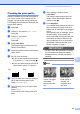
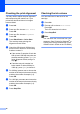


Table Of Contents
- USER’S GUIDE DCP-395CN
- Brother numbers
- Ordering accessories and supplies
- Notice - Disclaimer of Warranties (USA and Canada)
- Compilation and Publication Notice
- Brother® One-Year Limited Warranty and Replacement Service (USA Only)
- BROTHER MULTIFUNCTION CENTER / FAX MACHINE LIMITED WARRANTY (Canada only)
- Table of Contents
- Section I: General
- Section II: Copy
- 4 Making copies
- Section III: Direct Printing
- Section IV: Software
- Section V: Appendixes
- A Safety and Legal
- B Troubleshooting and Routine Maintenance
- C Menu and Features
- D Specifications
- E Glossary
- Index
- brother USA/CAN

Troubleshooting and Routine Maintenance
91
B
Cleaning the scanner glass B
a Lift the document cover (1). Clean the
scanner glass (2) and the white plastic
(3) with a soft lint-free cloth moistened
with a non-flammable glass cleaner.
Note
In addition to cleaning the scanner glass
with a non-flammable glass cleaner, run
your finger tip over the glass to see if you
can feel anything on it. If you feel dirt or
debris, clean the scanner glass again
concentrating on that area. You may need
to repeat the cleaning process three or
four times. To test, make a copy after each
cleaning attempt.
Cleaning the machine’s
printer platen B
CAUTION
Be sure to unplug the machine from the AC
power outlet before cleaning the printer
platen to avoid an electrical shock.
a Lift the scanner cover until it locks
securely in the open position.
b Clean the machine’s printer platen (1)
and the area around it, wiping off any
scattered ink with a dry, lint-free soft
cloth.
2
1
3
1